
Best Apps to Learn Piano: 6 Tools, One Per Problem
The best apps to learn piano are not courses: a metronome, a timer, a chord reference, a score scanner, a reading trainer and a backing band. All six tested.
Updated 23 min read
The short answer: the best apps to learn piano are mostly not courses. They’re six small tools that each fix one specific thing practice keeps breaking — the pulse, the shape of the session, the chord you can’t name, the page you can’t hear, the reading speed that gates everything else, and the loneliness of playing alone.
TL;DRThree things, thirty seconds
- Use tools, not another course. The six below each fix one thing practice keeps breaking — the pulse, the session, the chord symbol, the unheard page, the reading speed, the missing band. Three have real free tiers, so you can find out which one you need before spending anything.
- They stack — that is the point. Nothing here overlaps, so running the timer, the chord reference and the reading trainer together is a normal setup rather than three apps too many. Only one is ever open at a time anyway.
- Being stuck is an obstacle, not a limit. Nobody stalls at the piano for want of talent — they stall on an unreliable pulse, on slow reading, on a chord symbol that means nothing under the hand. Every one of those has a name, a tool, and a way to work at it. Find yours below.
Search for piano apps and you get the same eight results: Simply Piano, Skoove, Flowkey, Yousician, Piano Marvel, Playground Sessions, Pianote, Hoffman Academy. All-in-one courses, nearly all of them an annual subscription that renews for as long as you keep it, and a good share of the lists recommending them are written by the companies selling them.
Those apps answer one question: which subscription should I buy? This article answers a different one: what is actually open on the music desk during the forty minutes I sit down to practice?
That’s a workflow question, and it has a different answer. Six tools, each doing one job well — four bought once, two on subscription. None of them is a course. Together they cover the whole session.
1. Pro Metronome — the pulse
A metronome is the closest thing to a teacher you can switch on, and almost nobody uses one properly. The default use — click at 120, play along, feel vaguely judged — wastes most of what the tool can do.
What makes this one worth choosing. Pro Metronome (EUMLab, published on the App Store by Polybeat Limited) does four things that matter at a keyboard:
- Subdivisions. Triplets, dotted figures, sixteenths. For hands-together work this is the single most useful feature in the app — hearing the subdivision is what stops the left hand arriving late.
- Per-beat accent control. Every beat can be set to f, mf, p or muted, and it handles odd meters like 4+3/4. Muting beats 2 and 4 forces you to carry the pulse yourself.
- Polyrhythms. Two rhythm tracks at once — 3-over-4, 4-over-5. If you’re anywhere near Chopin or Debussy, this is the practice tool for those bars.
- Rhythm Trainer and Practice Mode. The trainer mutes bars entirely to test your internal clock; Practice Mode ramps the tempo automatically across a block, so a ten-minute speed-building exercise runs itself.
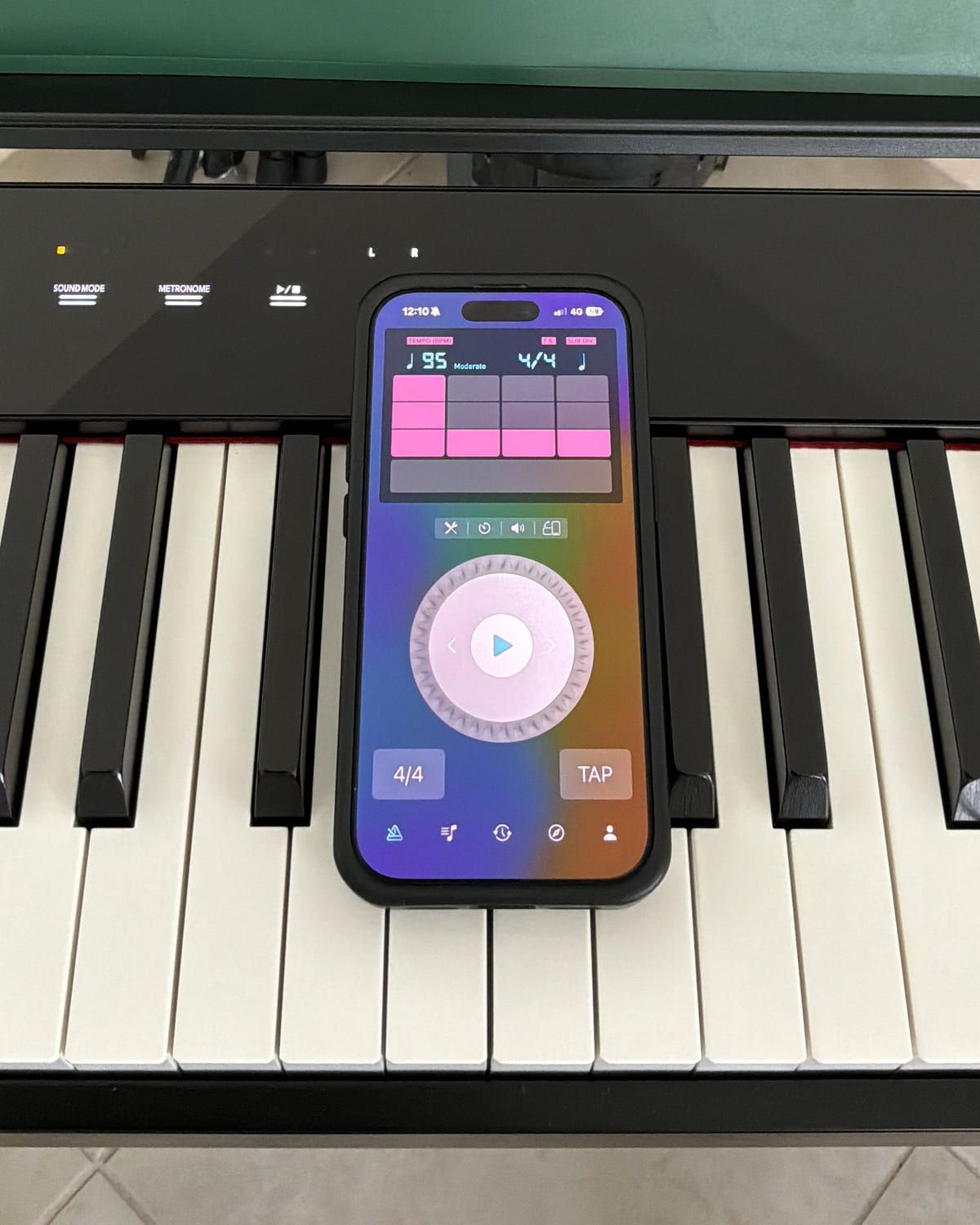
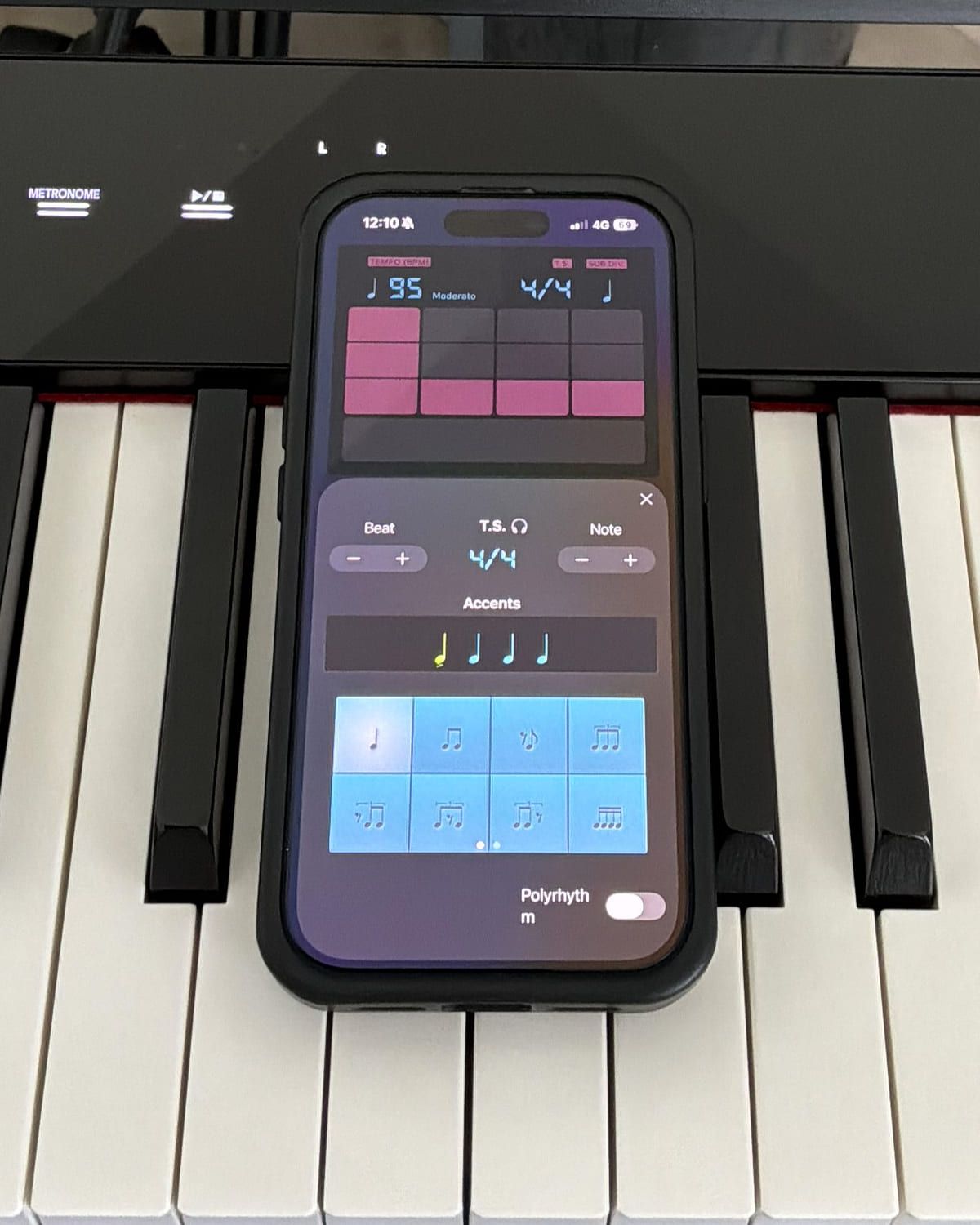
Visual and haptic modes matter more than they sound: when both hands are busy and the room is loud, a flash or a buzz reaches you when a click doesn’t.
My take. It is simple, and it is legible from where you actually sit — the controls are large enough to read at arm’s length across a music desk, which sounds like a small thing until you are using one. The palette is warm rather than clinical. And most of what I reach for is free: I only hit the paywall going after the more specific time signatures. For ordinary metronome work with real configuration behind it, this is the one that stays on the desk.
2. Practice Timer — the session itself
Every other app on this list improves something you do inside a practice session. This one is about the container, and the container is where most practice quietly leaks.
The research is uncomfortably consistent on this point. What separates strong practice from weak isn’t hours, it’s structure: named items decided before you play, bounded in time, with real rest between them. We covered the evidence in how to practice music effectively and the arithmetic in how long you should practice. The hard part was never knowing this. It’s doing it at 7pm when the piano is right there.
What it does. You build a plan of up to ten named exercises, each with a focus type, a key, a duration and a rest. One dial starts the session; work and rest phases run automatically with audio cues, so you’re not watching a screen. Smart shuffle reorders the plan in a tap — that’s interleaving, which reliably beats grinding one item to death. Afterwards you get a session summary, a progress dashboard, a Focus Mix showing where the time actually went across eight practice categories, Key Areas showing your harmonic coverage, and streaks.
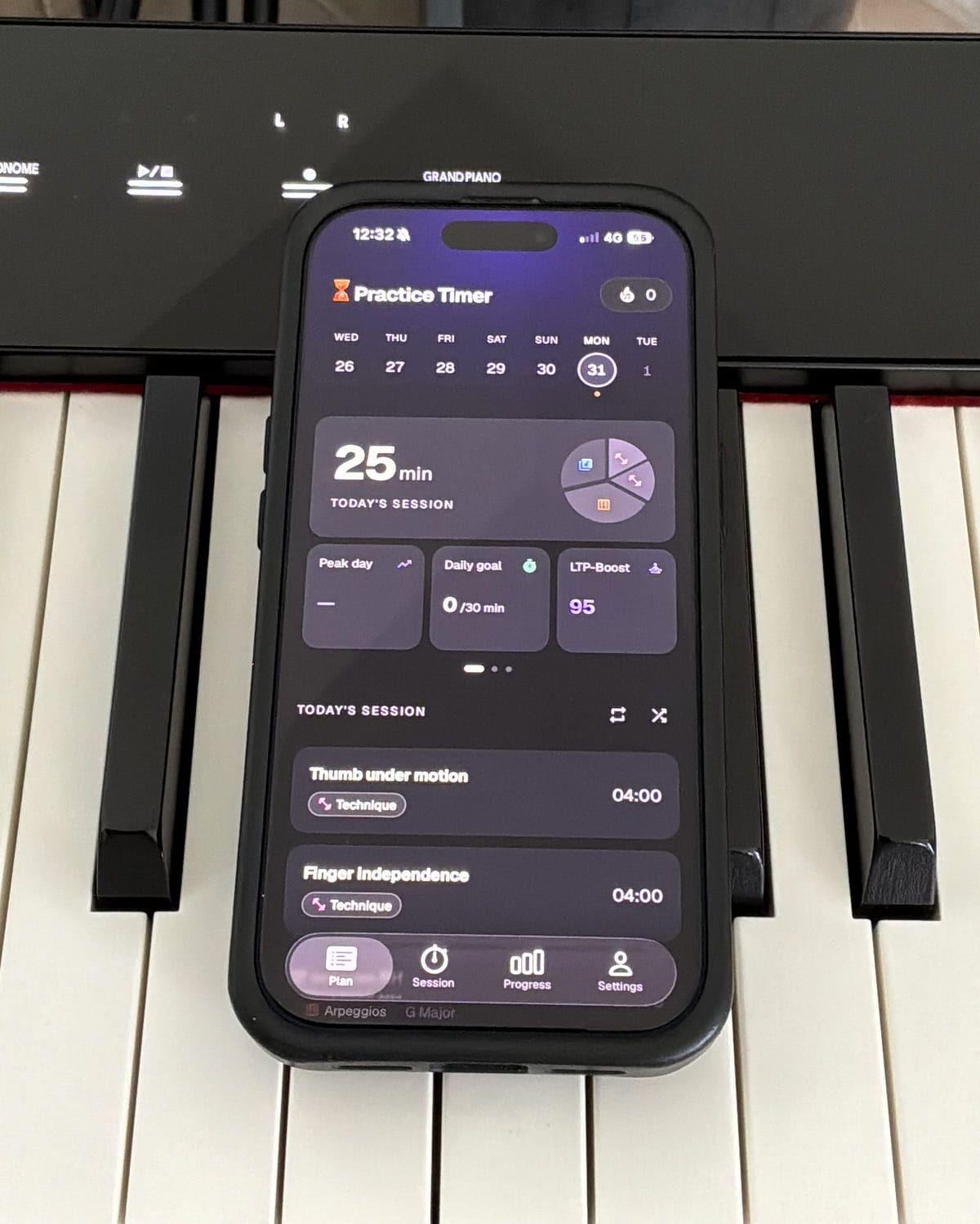
The part that doesn’t exist elsewhere is the LTP-Boost score — a 0–100 read on whether the session’s work-and-rest composition is shaped to support learning. LTP is long-term potentiation, the process that turns repetitions into durable skill, and it happens substantially during the pauses rather than the repetitions. The score grades the structure, not the duration, which is exactly the number most practice trackers refuse to look at. The reasoning is on the method page.
3. Piano Chords and Scales — the harmony reference
Guitarists have chord shapes. Pianists have chord symbols, which are a different problem: the symbol tells you the notes but not the voicing, not the inversion, not which of the twelve possible hand positions is the one that leads smoothly to the next chord.
What it does. Piano Chords and Scales (Sincere Apps SIA) is a keyboard-first reference. Every chord and every scale is drawn on a piano and on the grand staff, and every one of them plays back — ascending, descending or as a block. Chords carry their inversions, scales carry fingerings for both hands, and an interactive circle of fifths sits behind the lot.
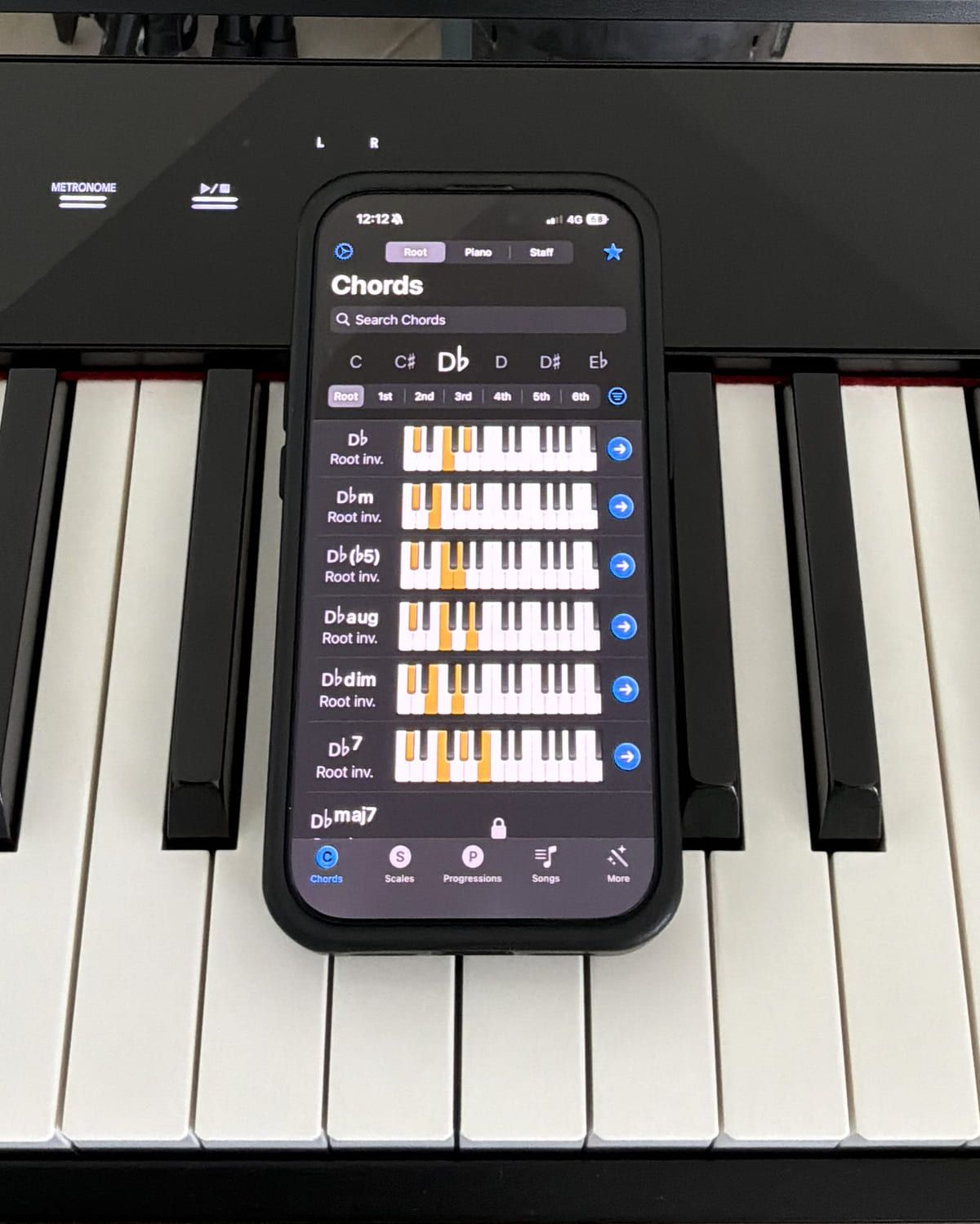
Three things lift it above a chord dictionary, and all three are piano-specific:
- It answers in shapes, not note names. The chord is a highlighted hand position on a keyboard, which is the form you actually need at the instrument — most chord references were built for guitar and treat the piano as an afterthought.
- Fingerings for both hands. On scales, and shown as the scale plays. It is the detail that separates a reference for pianists from a reference that happens to include a piano diagram.
- A reverse lookup, three ways. Find a chord by its root, or by tapping the notes on the keys, or by writing them on the staff — that’s the Root · Piano · Staff switch in the photo. Connect a digital piano and MIDI in does the same job with your hands: play the voicing, read back what it’s called. It’s the fastest way to identify that mystery chord in bar 12, or the one you found by accident and want to keep.
There’s a composing half too — a progressions collection, and a song composer that suggests chords fitting the scale you’re in — which is useful, and not the reason to install it.
My take. Simple in the same way the metronome is, and for the same reason: it answers in pictures. Chords and scales are drawn rather than described, and that is the whole value, particularly if you are starting out — you see the shape instead of decoding a list of note names. Basic and intermediate chords are all there without paying; the paywall starts where the qualities get exotic. And finding what you came for takes no learning at all, which is the highest compliment a reference book gets.
4. PlayScore 2 — the page you can’t hear yet
Every pianist has the same drawer: sheet music you bought, opened once, and abandoned because the first read-through was too slow to reveal what the piece even sounds like.
What it does. Point your camera at printed sheet music and PlayScore 2 (Organum Limited) reads it and plays it back. Not as a novelty — with tempo control you can change mid-playback, drag-to-loop, transposition, dynamics including hairpins, and full navigation through repeats, first and second endings, D.S., D.C. and Coda.
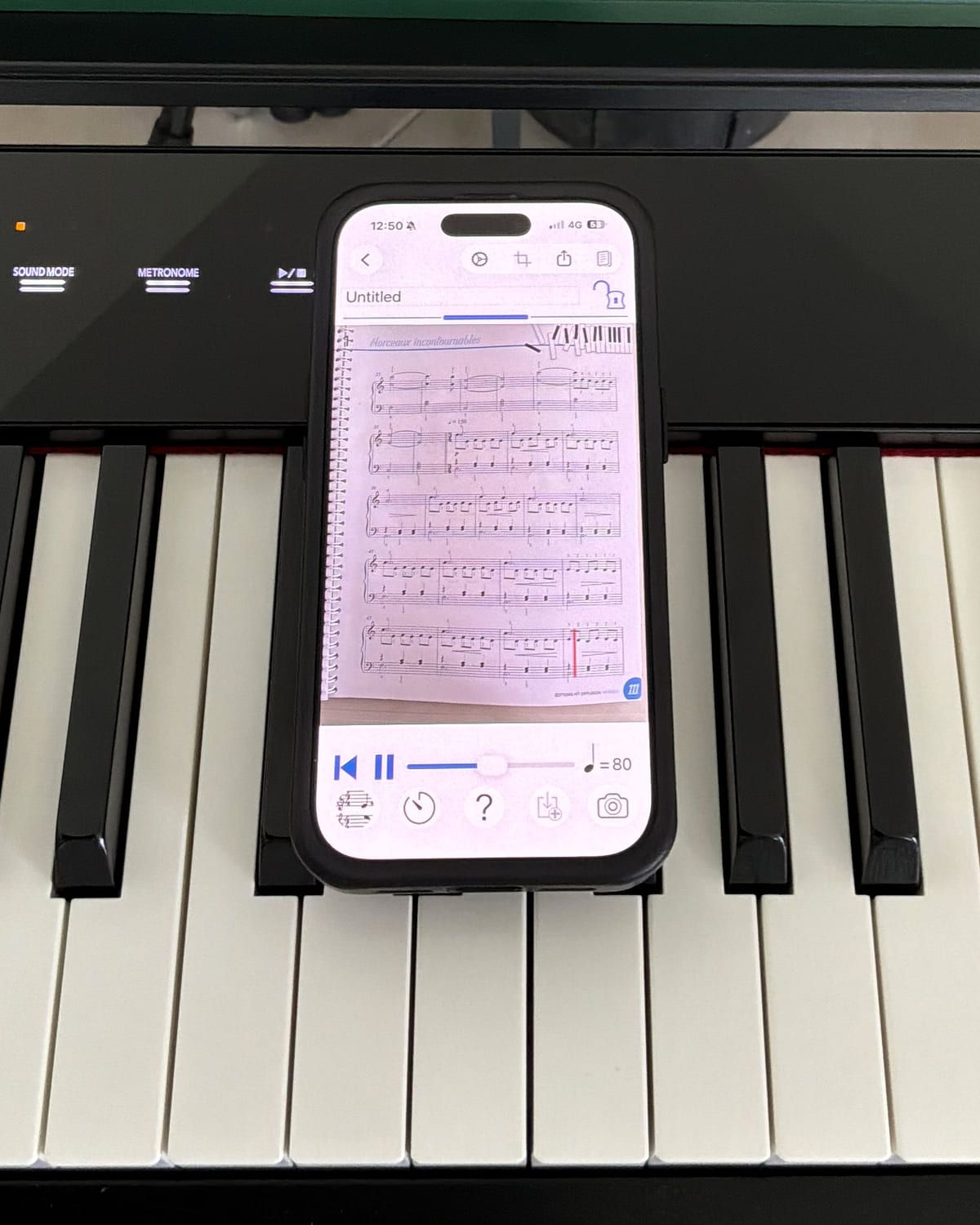
The feature that earns its place on a piano list is called Play-my-part: mute or adjust the volume of each part independently. Mute the right hand and the app plays the left while you play the right. That’s hands-separate practice with an accompanist, from a photograph of the page, and no other tool in this list does it. In a hands-on review, tonebase found it read high-register passages with multiple ledger lines correctly — the exact place weaker scanners fall apart — and singled out the same per-staff muting for hands-separate work.
My take. Of every score-reading app I’ve tried, this is the most effective, and it isn’t close. The interface looks dated but it goes straight at the thing you opened it for. Bring in a score, or photograph one off the desk, and it plays. Immediately. The competition is slower and buried under options nobody uses. This one does the single job you wanted, fast.
5. Complete Music Reading Trainer — reading, answered on the actual keys
Sight-reading is the skill that decides how much music is available to you, and it’s usually the one practiced worst — a few minutes of a piece you half-know, unmeasured, with no feedback.
What it does. Complete Music Reading Trainer (Binary Guilt Software) is 270 progressive drills across 26 chapters and three levels. It covers all seven clefs, key signatures up to six sharps and flats, custom drills you can design yourself, and — the part that matters for pianists — mixed-clef drills on the grand staff, so you’re reading treble and bass together rather than alternating between two separate skills.
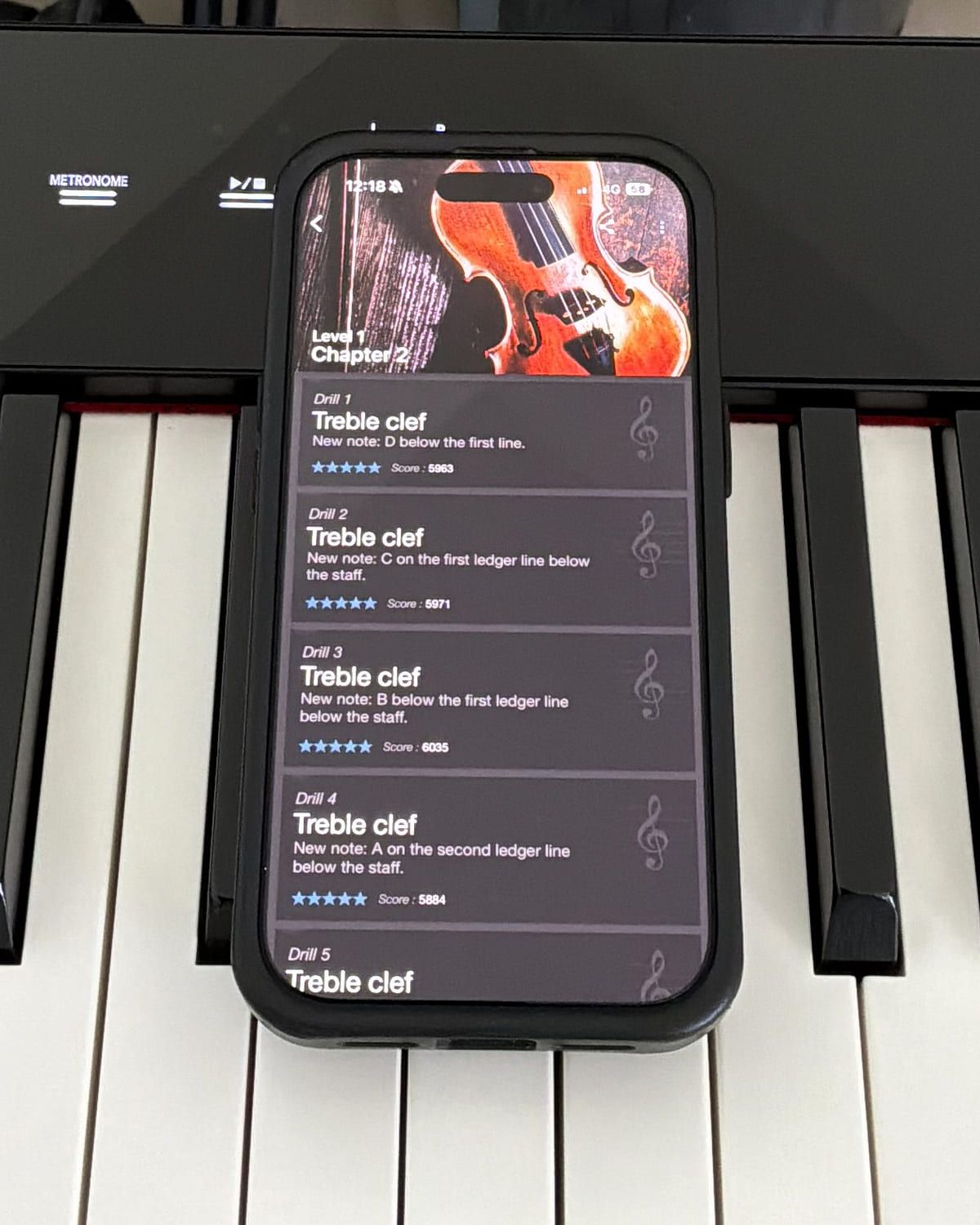
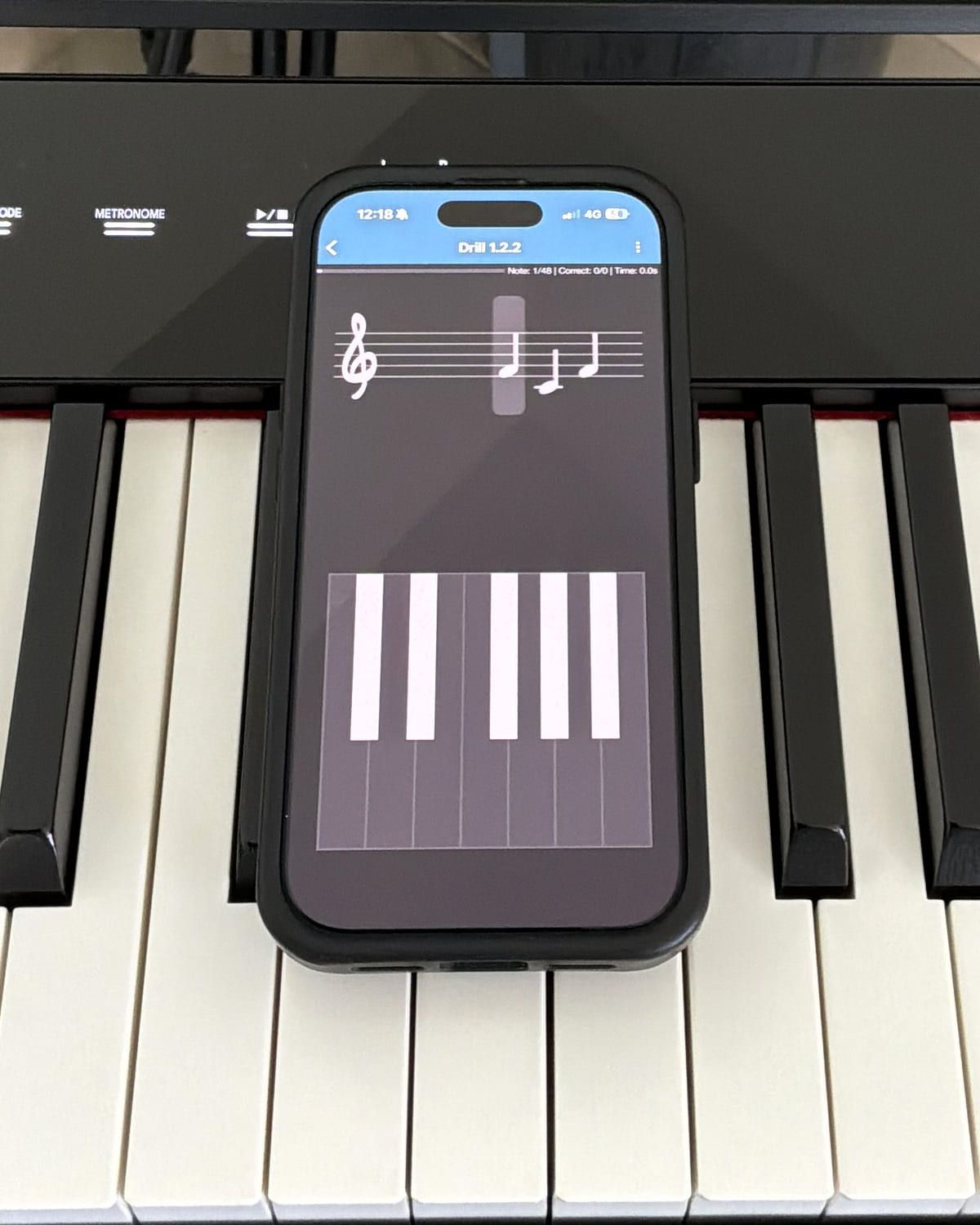
There’s a small detail with an outsized effect: four notation display styles, including a handwritten one. Reading engraved notation perfectly and then freezing in front of a hand-copied part is a real and common failure.
And you can answer with your digital piano. Four input methods: an on-screen note circle, a virtual keyboard, a connected MIDI controller, or the microphone. Connect your digital piano over USB and you answer by playing the actual key, which trains the eye-to-hand path rather than the eye-to-note-name path. On iOS the app will also connect to a Bluetooth MIDI controller directly from its own menu, so a modern Bluetooth-capable digital piano can pair without a cable.
My take. The Bluetooth MIDI connection is the whole app, and it is why this is the one I’d install first. You sit down at the piano, pair from the app’s own menu, and do the reading drill on the actual keys — no cable, no setup ritual, nothing between deciding to practice and practicing. It is genuinely interactive in a way a tap-the-note-name quiz never is. The difficulty scale is properly built, too: progressive, structured, each drill adding one thing. Improving your reading this way is closer to fun than it has any right to be, and the price is very reasonable. This is the recommendation I’d defend hardest on the page.
6. iReal Pro — the band that shows up
There’s a specific gap that solo practice cannot close. You play a piece cleanly alone, then someone counts in and everything falls apart — because playing alone lets you set the tempo, and playing with others doesn’t.
What it does. iReal Pro (Technimo) turns a chord chart into a backing band: bass, drums and comping across 50 accompaniment styles, from swing and bossa nova to blues, funk and rock. You mute the piano part and become it.
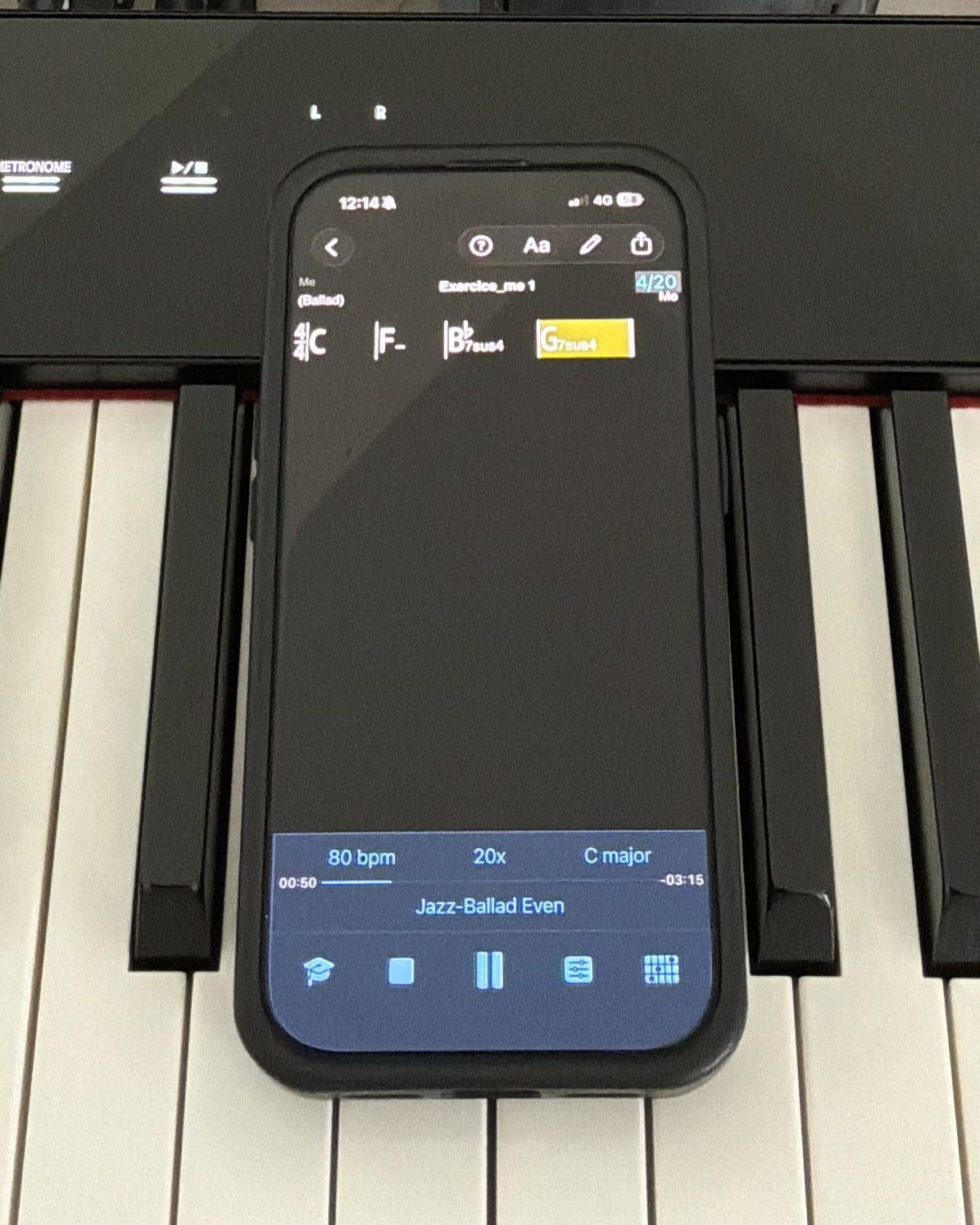
Four things make it a practice tool rather than a toy:
- The forum library. Thousands of community-shared charts, free, and a built-in editor for anything missing. This, more than the app, is the actual asset.
- Automatic key cycling. Set it and the tune moves up by any number of semitones at every repeat. This is the most efficient way there is to drill a standard through all twelve keys, and having to do it by hand is why most people never do.
- Automatic tempo increase. Between 1 and 20 bpm added at each repeat, so a speed ramp runs itself while you keep playing.
- Section looping. Any selection of two bars or more repeats indefinitely — so the eight that are beating you run at 70 bpm, with a band, until they aren’t.
My take. This is the one on the list I’ve used least, because it doesn’t fit my routine — and I understand completely why so many people live inside it. If what you want is players behind you while you work on rhythm, on improvising, on musicality generally, it is very good at that. Two things to know before you commit, from someone outside its core audience. It is jazz-shaped, and it does not pretend otherwise: if you’re after backing for pop and popular repertoire, alternatives will suit you better and you should look at them first. And although it ships on Android and desktop, you buy each platform separately, so in practice most people meet it as an iOS app and stay there. For anything jazz-shaped, though, it is superb — and of everything on this list, it is the one most likely to make you sound better than you are, which is what the next section is about.
The rule that applies to all six: the tool has to come off
Every app here works the same way underneath. Each one puts information into the room that wasn’t there before — a click, a played-back left hand, a chord name, a drummer, a green tick. Motor-learning research has a specific warning about that, and it’s the most useful thing to know before you install any of them.
Reviewing decades of work on feedback, Salmoni, Schmidt and Walter found a pattern that keeps repeating: information supplied during practice improves how you perform while it’s there and can leave you worse off once it’s gone (Salmoni et al., 1984). The mechanism is the uncomfortable part. Reliable external feedback lets you stop attending to your own — the kinesthetic and auditory signals you would otherwise be using to build an internal error detector. The tool does the noticing, so you never learn to notice.
Winstein and Schmidt put a number on it. Learners given feedback after every attempt outperformed learners given it after only half of them during practice — and then scored worse on a delayed retention test (Winstein & Schmidt, 1990). Half the feedback, better learning. That result has been replicated across many kinds of skill, and it’s the same shape as Bjork’s desirable difficulties: the practice condition that feels smoothest is frequently not the one teaching most (Bjork & Bjork, 2011).
Which gives one operating rule for everything above:
Run the block with the tool. Then run it once without.
Metronome on for the speed ramp, off for the final repetition. Backing track for four passes, silence for the fifth. Score playback while you learn the left hand, nothing while you play it. MIDI drills until the chapter is clean, then name the notes off a page with the app closed.
If a passage only survives while the app is running, you haven’t learned it yet — you’ve learned it with the app, and the audition doesn’t have the app. This is also the honest answer to why practice can feel excellent and produce nothing: smoothness during a session is a poor predictor of what’s there tomorrow, which is the same finding behind interleaving and behind resting on purpose.
The six, side by side
| App | What it fixes | What you buy | How it’s sold | Takes MIDI in |
|---|---|---|---|---|
| Pro Metronome | The pulse | The Pro unlock | One-time, with subscriptions and seven à-la-carte unlocks alongside | No |
| Practice Timer | The shape of the session | Monthly or yearly plan | Subscription, 3-day trial on yearly, no free tier | No |
| Piano Chords and Scales | Chord symbol → hand shape | An “unlock all features” tier | Free tier, then one of ten overlapping in-app purchases | Yes — in and out |
| PlayScore 2 | Hearing a score you own | Productivity or Professional | Free tier, then one of two subscriptions | No — but it exports MIDI files |
| Complete Music Reading Trainer | Reading speed | The full-version unlock | One-time, first chapter of each clef free | Yes |
| iReal Pro | Playing with other people | The app itself | One-time, paid up front, per platform | No |
All six are on iOS. Five are on Android — Practice Timer is the exception, with Android in progress. PlayScore 2 also runs on Windows, Piano Chords and Scales on Mac and Vision Pro, and Complete Music Reading Trainer has a browser and desktop version alongside its Huawei and Amazon builds.
Which of these actually talk to your digital piano
Almost no roundup answers this, and it’s the first question anyone with a MIDI keyboard asks. Two of the six take note input, and they’re the two where it changes what the app is.
Complete Music Reading Trainer turns from a quiz into a keyboard drill. Answering with your hand instead of tapping a note name trains the path you actually use when reading, and it’s the difference between knowing the note is an F and finding it. USB is the reliable connection; on iOS, Bluetooth MIDI works from the app’s own menu.
Piano Chords and Scales runs it the other way. Play a voicing and the app tells you what you just played — the fastest way to identify something you found by accident, or to check that the shape under your hand is the one you meant.
The other four take no note input. PlayScore 2 exports MIDI files, which is a different thing entirely: useful for getting a scanned score into a DAW, useless for answering with your hands.
Where the course apps fit
Simply Piano, Flowkey, Skoove, Yousician and the rest are a different category, not a worse one, and it’s worth being exact about the difference.
A course answers what to play next. It hands a complete beginner a sequenced curriculum, songs at the right difficulty, video instruction and a listening engine that tells them whether the note was right. If you have never played and have no teacher, that sequencing is the thing you cannot supply yourself.
These six answer what happens during the forty minutes. They assume you already know what you’re working on and make the working better.
Two practical consequences. Running a course app and this toolkit side by side is a perfectly normal setup — they don’t overlap much. And the tools are what stay useful after the course stops being useful, which for most people is somewhere in the second year, when the curriculum runs past the level they can actually play and the app has no way to fix the specific eight bars in front of them.
One caution, and it follows straight from the take-the-tool-off rule earlier: a course app is continuous feedback by design — it listens and judges every note. Feedback on every attempt is the condition that came out worst on retention in Winstein and Schmidt’s experiments, and a listening engine is that condition with the dial turned all the way up. Play the lesson through with the listening on, then play it once more with the app closed. The second pass is the one that tells you what you know.
Putting six apps into one session
Six apps sounds like a lot of tapping. In practice they’re staggered, and only one is ever open.
| Block | Min | What’s open |
|---|---|---|
| Plan written the night before | — | Practice Timer |
| Technique — key of the day, subdivided click | 5 | Pro Metronome |
| Rest | 1 | — |
| Repair — yesterday’s broken bars, hands separate | 10 | PlayScore 2, left hand playing back |
| Rest | 1 | — |
| Reading drill — answered on the keys | 6 | Complete Music Reading Trainer |
| Rest | 1 | — |
| Harmony — one progression, then the same one with a band | 6 | Piano Chords and Scales → iReal Pro |
| Repertoire run — mark what fails, fix nothing | 5 | Nothing |
Thirty-five minutes, five playing blocks, three real rests — and the fifth block runs with every app shut, which is the operating rule from earlier built into the shape of the session rather than left to willpower. The timer runs the whole thing; the other five open when their block starts and close when it ends.
The underlying shape — warm, repair, build, close — is the one laid out in how to plan a practice session, and what each block is buying you is covered in what to practice on piano every day.
Frequently asked questions
Do I need all six apps?
No, and installing six at once is the fastest way to use none of them. Pick by which job is currently broken. If your rhythm collapses under pressure, that’s the metronome. If you own sheet music you’ve never heard, that’s the scanner. If sessions feel productive but nothing sticks by Thursday, that’s the structure problem. Add the second app when the first has become a habit.
Which app should I get first?
Complete Music Reading Trainer, for most people. The free chapters tell you within ten minutes whether it suits you, and reading speed is the constraint that quietly limits everything else — including how quickly you can learn the piece you actually want to play.
What is the best free app to learn piano?
There isn’t a good free course, but three of these six have real free tiers worth using before you spend anything. Complete Music Reading Trainer gives you the first chapter of every clef. Piano Chords and Scales looks up chords and scales for free, with the deeper qualities locked. PlayScore 2 will play a single photographed page from the camera with no subscription at all. Between them that’s a reading drill, a chord reference and a way to hear a score you own, for nothing — which is enough to find out which of the six problems is actually yours. (iReal Pro’s library of thousands of community charts is free too, but only once you’ve bought the app.)
Can I use these with a digital piano over Bluetooth?
Complete Music Reading Trainer supports MIDI controllers and will connect to a Bluetooth MIDI controller from its own menu on iOS, so a Bluetooth-capable digital piano can pair without a cable and you answer drills by playing the keys. Piano Chords and Scales accepts MIDI in and out. USB is the more reliable connection for both. The other four take no note input.
Are these a replacement for Simply Piano, Flowkey or Skoove?
They’re a different category. Course apps teach you what to play through a sequenced curriculum with songs and video. These six make the practice itself work — timing, reading, harmony, accompaniment and session structure. Plenty of people run a course app and this toolkit side by side, and the tools are what remain useful long after the course has been outgrown.
Do I still need a teacher?
For technique and interpretation, a teacher sees things no app can: your posture, your wrist, how the tone you’re producing differs from the one you think you’re producing. What these apps replace isn’t the lesson — it’s the six unsupervised days between lessons, which is where most of the actual learning has to happen anyway.
Which of these work on Android?
Pro Metronome, PlayScore 2, Piano Chords and Scales, iReal Pro and Complete Music Reading Trainer are all on Google Play. Practice Timer is currently iPhone and iPad, with Android in progress.
Isn’t a metronome already built into most apps?
Usually a basic one — a click at a tempo. What justifies a dedicated metronome is everything past that: subdivisions, muted beats, polyrhythms, automatic tempo ramps. Those are practice techniques, not settings, and a built-in click doesn’t do them.
How do I know whether any of this is working?
Not by total minutes, and not by how the session felt — smoothness during practice is a poor predictor of what survives to tomorrow (Bjork & Bjork, 2011). Ask instead whether the repair block got its share or comfortable run-throughs ate it, whether the gaps were real rest or scrolling, and whether you can name in bar numbers what’s better than last week. That’s the reasoning behind the method we built the app around — the shape of the session, not its length.
The bottom line
The piano app market sells courses because courses are easy to sell: one subscription, one promise, one place to point a beginner. But almost nobody stalls at the piano because they ran out of lessons. They stall because the pulse is unreliable, the reading is slow, the chord symbol means nothing under the hand, the sheet music never got heard, playing with others is terrifying — and forty minutes disappears without a plan holding it together.
Six tools. Four bought once, two on subscription. Each one aimed at a single thing that’s currently broken.
Fix the one that’s yours first — and whichever you pick, take it off before you finish.
References
- Salmoni, A. W., Schmidt, R. A., & Walter, C. B. (1984). Knowledge of results and motor learning: A review and critical reappraisal. Psychological Bulletin, 95(3), 355–386. doi:10.1037/0033-2909.95.3.355
- Winstein, C. J., & Schmidt, R. A. (1990). Reduced frequency of knowledge of results enhances motor skill learning. Journal of Experimental Psychology: Learning, Memory, and Cognition, 16(4), 677–691. doi:10.1037/0278-7393.16.4.677
- Bjork, E. L., & Bjork, R. A. (2011). Making things hard on yourself, but in a good way: Creating desirable difficulties to enhance learning. In M. A. Gernsbacher, R. W. Pew, L. M. Hough, & J. R. Pomerantz (Eds.), Psychology and the Real World (pp. 56–64). Worth Publishers. PDF
Every photograph on this page was taken by us, of these apps running on our own digital piano — no press images, no store screenshots. The My take sections are first-hand opinion after using each app; everything outside them is checked fact. App names, features and payment models were verified on August 31, 2026 against each developer’s own site and the US App Store listing. Practice Timer is our own app. The other five are apps we use and have no commercial relationship with, and nothing here is an affiliate link. This article quotes no prices on purpose: they change, they vary by region and promotion, and a stale number is worse than none — read the current figure off the store listing before you buy.